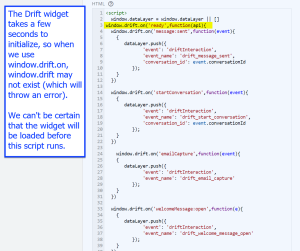
Drift is a popular support chat client. Usually, we’ll install Drift using Google Tag Manager by placing its base code in its own tag, and then setting up events in other tags. In this case, however, the tags that required the widget to be loaded were loading before the base code, causing errors in the console.
Although Google Tag Manager has options allowing tags to be sequenced (such that they run one after the other), these wouldn’t solve the issue by themselves. There’s a time gap between when the Drift base code finishes running and when the widget is actually available to manipulate – which means that running code immediately after the base code finishes won’t guarantee an available widget.
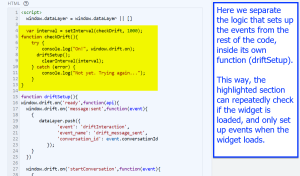
To bridge this time gap, we’ll need to use a simpler solution – setInterval(). JavaScript’s setInterval() function takes two arguments and does two things. These are the arguments:
And these are the results:
Using setInterval(), we repeatedly run a function called checkDrift(), which uses a try-catch block to manipulate the Drift widget just like the earlier code did, but if it errors, we handle it separately using the catch statement, so that the code doesn’t stop.
We used setInterval to create a recurring check for a widget to create more consistent code acting on that widget.