Power Homeschool runs online courses using the Acellus app. In addition to its other functions, the Acellus app is able to open a number of web pages based on a whitelist – in particular, it can open powerhomeschool.org web pages. However, if the Acellus app tries to load a URL that isn’t on that whitelist, it’ll open that URL up in a new browser window. That includes any iframes or external scripts, meaning that social media pixels will cause a new browser window to open.
The client wanted us to make sure that only whitelisted URLs were being loaded on the Acellus in-app browser.
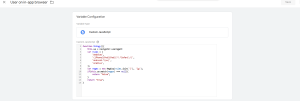
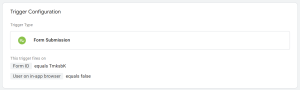
First, in order to distinguish Acellus in-app browsers from non-Acellus browsers, we added the user agent string as an event parameter in Google Analytics. Using the data we got from that, we wrote a Custom JavaScript variable to determine if a user was on the Acellus in-app browser. If they were, we would choose not to load some tags.
Fixed an issue where loading the Trade Desk pixel in a special in-app browser would cause a blank browser window to open.