
Enhancing eCommerce Tracking with GA4 Event Modification

Posted by: Felix Kaboto Date Posted: February 28, 2024
Back to Case Studies

Issue

Keramida, Inc.’s GA4 reports for their online store were missing revenue data due to the absence of a “currency” event parameter for each purchase event.

Solution

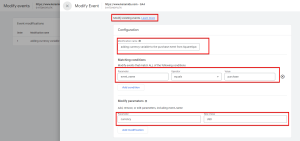
The solution used GA4’s event modification feature to add the missing “currency” parameter to the purchase events without updating the website code or GTM.

The steps included:

  • Navigating to the “Admin” section of Google Analytics.
  • Ensuring the correct account and property were selected.
  • Going to “Events” in the Property column.
  • Click on “Modify Event” and then “Create.”
  • Naming the modification clearly.
  • Setting conditions for the modification: “event_name equals purchase.”
  • Adding “currency” as the parameter and setting its value to “USD” in the “Modify parameters” section.
  • Creating the modification, which then automatically applied the currency parameter to all future purchase events, thereby enabling GA4 to show the revenue data.


Key Takeaways

  • GA4’s event modification feature lets you add new parameters to existing events in GA4.
  • This capability is handy for fixing missing or incomplete event data.
  • This feature can be helpful, but not in every case, especially if we have GTM; in this case, we do not, and the platform’s support for tracking using GTM was not yet stable at the time of the setup.
  • Check out GA4’s event modification documentation [link] for more details on limits and more examples.

Achievement

Successfully integrated the missing “currency” parameter to purchase events in GA4 to display accurate revenue data without editing GTM or website code.

Snippet/Screenshot/Link