WHILL has two sites (one for Canada and one for the US). Each website has a list of stores, but that list of stores can be accessed one of two ways: either through the retailer search or through the store list. WHILL wanted us to track whenever a “Get Directions” link within these lists was clicked, and wanted to send the name of the store along with that event. Even though the pages themselves are identical between the US and CA sites, the retailer search and store list pages organize their information slightly differently, so a bespoke solution for two different pages was required.
We wrote a quick script to use the clicked element to walk up the DOM and grab the store name. Th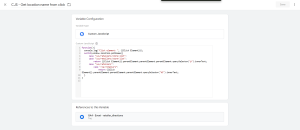
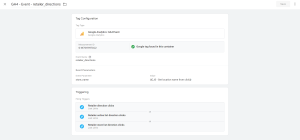 en, we sent the result of that script as an event parameter and turned that into a custom metric in GA4.
Implemented a snippet to capture the location name as part of a GA4 event when directions to that location were requested.
function(){
  switch(window.location.pathname){
      case "/us/retailers/store-list":
      case "/ca/retailers/store-list":
          return {{Click Element}}.parentElement.parentElement.parentElement.querySelector("p").innerText;
      case "/us/retailers":
      case "/ca/retailers":
          return {{Click Element}}.parentElement.parentElement.parentElement.querySelector("h3").innerText;
  }
}